Version 16.12
Version 16.12 was released today and is available for DOWNLOAD.
- Added Constrained VBR for the video codec rate control mode to Export.
- Added Fixed option to video GOP to Export.
- New audio mixing mode that does not affect levels.
- Increased usage of floating point for audio processing to improve quality.
- Added Occitan translation.
- More fixes for copying filters and LUT (3D) video filter.
More About the New Audio Mixing
The first thing you need to know about the new mixing mode is that it only applies to new projects. You might have already adjusted volume levels in existing projects, and we did not want to affect that.
Versions before 16.10 used a mixing technique that tried to be clever about generally preserving the levels of all sources without clipping, but it was discovered that it may introduce artifacts. So, versions 16.10 and 16.11 switched to a simpler method that adds samples, but it was also averaging them to avoid clipping, which was found to adversely affect levels. So, the new approach in this version is to simply add samples.
As a result, you may experience clipping. Now, as long as there is so-called headroom in the level each of source, this should rarely be a problem because high level samples from each source are rarely correlated. Here is where the Normalize filters are your friends because not only do they bring all sources to the same level, but the default target level includes headroom. In addition to listening for clipping, you can visually monitor it using the Peak Meter and/or Audio Waveform scope in the View menu.
If each source has headroom in its level but you still experience clipping, you can add a Gain/Volume filter to the Timeline - select the cornerstone at the top, left of the Timeline and use the Filters panel. This is like the Master Out gain control on a mixing console. Reduce the gain until you eliminate the clipping. If you find that you need to lower the gain more than you like try adding the Limiter filter.
Version 16.11 - Now a Portable App
Version 16.11 was released today and is available for DOWNLOAD.
By popular demand, this version includes a new so-called portable app feature. A portable app is one that can be run without having to install and register components into the system. Rather, it is a self-contained folder for the executable and its bundled dependencies. Shotcut has always been portable in this sense regardless of the operating system. Portable apps can be put on a USB stick/drive and run from there. Then, you can use the app from computer-to-computer simply by plugging the USB stick. However, to be truly portable, the app should also use the USB stick to store settings and other app data.
Like most apps, Shotcut has an app data directory wherein it stores its
thumbnails/waveforms database, presets, and log file. Normally,
it stores settings in a platform-defined manner such as the registry on Windows
or a plist file in ~/Library on macOS. Now, you can set the app directory using
the command line option --appdata <directory> or the Settings > App Data Directory
menu. When you do, then settings are instead saved in an INI file in the designated
folder. If you use the menu, Shotcut will try to migrate everything from the
current location to the new location only if there is not existing Shotcut
data in the new location. Otherwise, it simply lets you start using the
new directory adopting the settings and data. If you use the command line option,
the new menu item is hidden making it possible to integrate the app into
an app launcher/updater more seamlessly.
Here are some other changes in this version:
- Fixed drag-n-drop to Timeline after moving clip to different track.
- Fixed LUT (3D) filter for languages/regions that use comma for decimal point.
- Fixed Properties > Speed on macOS for languages/regions that use comma for decimal point.
- Added Gaelic (Scottish) translation.
Return of the 32-bit Windows Build
Improved compatibility
Version 16.10 was released today and is available for DOWNLOAD.
The 32-bit Windows version is back by popular demand! 32-bit apps still have the significant limitation that they can only use 2 GB RAM, and Shotcut still uses a lot of RAM. We will see what we can do to reduce memory usage in the coming months. In the meantime, consider limiting yourself to working in 720 pixels of vertical resolution for multitrack projects, and try to avoid using very high resolution still images (scale them down before using them in Shotcut).
For Linux users, when we upgraded the build machine OS to Debian 8 in July for the 16.07 version, we lost a lot of compatibility with older versions of popular Linux distributions. Some people only lost the Stabilize filter. When this combined with the Qt upgrade in the previous release - v16.09 - many users, such as those on Mint 17 or Ubuntu 14.04, could no longer run the latest Shotcut. That is fixed in this release by using Ubuntu 14.04 as the base OS image for the build.
Lens Correction and 3D LUT Filters
A forum user has contributed a Lens Correction video filter. Thanks TwitchyMcJoe! Another forum user suggested to add a 3D LUT filter. Fortunately, this was already available through the MLT+FFmpeg engine, and it was easy to add a UI to expose this powerful filter.
Merge Clips on the Timeline
If you have adjacent sub-clips from the same source clip on the timeline, now you can right click to open the context menu and choose “Merge clip with next” to merge the clips into one.
Tiles and Icons Views for Playlist
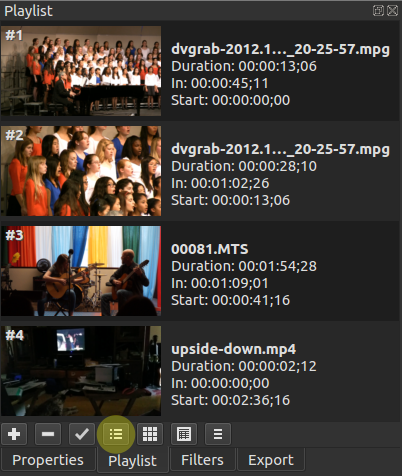
Thanks to Shotcut developer, Harald, new Tiles and Icons Playlist view modes were added to the new version 16.09, which is now available for DOWNLOAD. The old view mode is still available and named Details.

Video Tutorial: Film Restoration
In this tutorial Shotcut developer, Brian, shows how he uses some filters to clean up old, family 8mm films he had converted to digital.
Search
Recent Posts
- Posted on 27 Sep 2026
- Posted on 01 Aug 2026
- Posted on 25 Jun 2026
- Posted on 29 Apr 2026